How to download a TikTok story in 3 steps
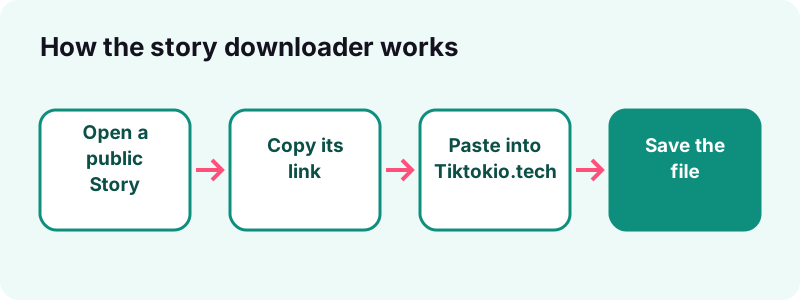
- Copy the story link. Open the public Story in TikTok, tap Share and choose Copy link while the Story is still live.
- Paste it into Tiktokio.tech. Come back to this page, paste the link in the box at the top and tap Download.
- Save the file. Pick the video, the image or the audio and save it to your device. The download links work for one hour.
What is the TikTok story downloader?
It is a free web page that turns the link of a public TikTok Story into a file you keep. A video Story comes back as an MP4, a photo Story as images, and the sound as an audio file when TikTok serves it.
You need nothing but the link. The TikTok story downloader runs in Safari, Chrome, Edge or Firefox, on a phone or a computer, and never asks for your TikTok account.
What can it save, and what not?
- A public Story that is still live, or kept in a public Highlight.
- Video Stories as MP4, without the moving watermark when TikTok serves that copy.
- Photo Stories as image files, and the sound when it is available.
- Not Stories from private accounts, expired Stories or Stories limited to friends.
Other jobs have their own pages: the video downloader for feed videos, the photo downloader for slideshows and the MP3 page for sounds.
How do TikTok Stories work?
A TikTok Story is a photo or video that stays visible for 24 hours. Viewers find it on the creator's profile, in the inbox and in the For You and Following feeds, and they can reply or react to it.
“TikTok Stories allow you to share photos and videos that stay visible for 24 hours.”
Where do TikTok stories appear?
TikTok's page on watching Stories lists four places:
- the inbox,
- public profiles,
- the Following feed,
- the For You feed.
How do people post a Story?
In the app, the creator taps Add post, then Story under the Record button, and picks Photo, Text or a video length. They can also tap their profile photo at the top of the Following feed, inbox or profile, add a filter, sound, text or stickers, and tap Your Story to post.
How long does a TikTok story last?
24 hours. After that the Story disappears from the feeds and the profile, unless the creator saved it into a Highlight, which keeps it on the profile for longer.
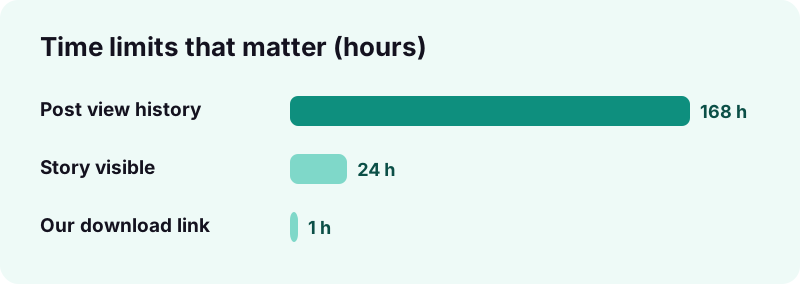
Three time limits matter when you want to keep a Story:
| Limit | Length | Source |
|---|---|---|
| Story visible to viewers | 24 hours | TikTok Help Center, TikTok Stories |
| Highlight on the profile | Until the creator removes it | TikTok Help Center, TikTok Stories |
| Post view history window | Posts from the last 7 days | TikTok Help Center, post view history |
| Tiktokio.tech download link | 1 hour | Our server |
In practice, that means:
- save a Story you care about on the same day you see it;
- download the file within an hour of tapping Download;
- check the creator's Highlights if the Story is already gone.
Can you still save a story after 24 hours?
Only if it lives on in a Highlight. Once a Story has expired and is not in any Highlight, TikTok no longer serves it, and a TikTok story downloader has nothing to fetch.
Who can see a TikTok story?
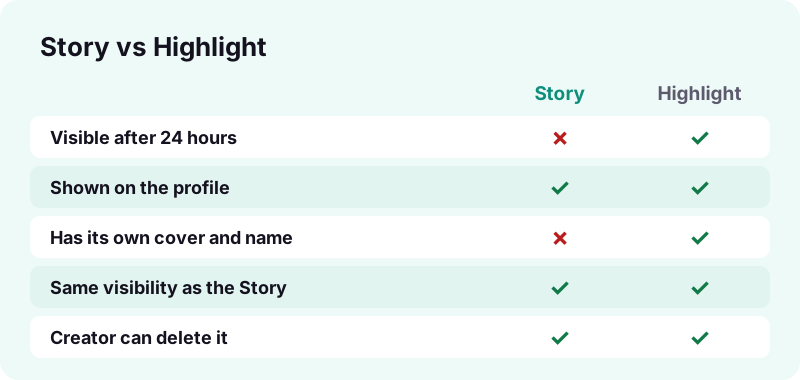
Whoever the creator allows. Each Story has post settings, as other TikTok posts do, and the account's privacy decides who can open it at all. A Highlight keeps the same audience as the original Story.
TikTok says it plainly on the Stories help page: Highlight visibility matches the visibility settings of the original Story.
Does a new Story copy the last post's privacy?
For posts, yes. TikTok's guide to making a post says a new post keeps the privacy setting of the previous one. So a creator who last posted as Only you may find the next Story limited too, until they change it.
- Everyone on a public account: the link opens for anyone, and we can save it.
- Friends or followers only: it is not public, so we cannot open it.
- Private account: only approved followers can watch, and we cannot open it.
Can creators see who viewed their TikTok story?
Yes. TikTok shows the creator the total number of views on each Story and the accounts that watched it. They swipe up on the Story to see the list.
TikTok adds a warning for viewers on its Watching Stories page:
“Keep in mind that people can see you viewed their Story even if your account is private or your profile view history is turned off.”
Is story view history the same as post view history?
No. TikTok's post view history page says Story view history is not affected by that setting and is kept separate. Post view history only covers posts from the last 7 days and is limited to people aged 16 or older with fewer than 5,000 followers.
| Story views | Post view history | |
|---|---|---|
| Who sees viewers | The Story's creator | Users who turn the setting on |
| Can viewers turn it off? | No, per TikTok Help | Yes, in Privacy settings |
| Time covered | While the Story is up | Posts from the last 7 days |
| Age or follower limit | None stated | 16+, under 5,000 followers |
Does Tiktokio.tech show up as a story viewer?
Tiktokio.tech never signs in to TikTok, so no account of yours is used when our server reads a Story link. We only fetch what TikTok makes public for that link.
- You do not type your TikTok username or password anywhere on this site.
- Our server does not like, reply to or react to anything.
- The file is sent from TikTok's own CDN, and the link we give you expires after one hour.
If you watch the Story in the TikTok app before copying its link, that view is yours, and TikTok shows it to the creator as described above.
Public vs private accounts: which stories can you save?
Only Stories from public accounts, shared with Everyone. A private account approves each follower, and TikTok blocks downloads from it, so its Stories never reach a public link our server can read.
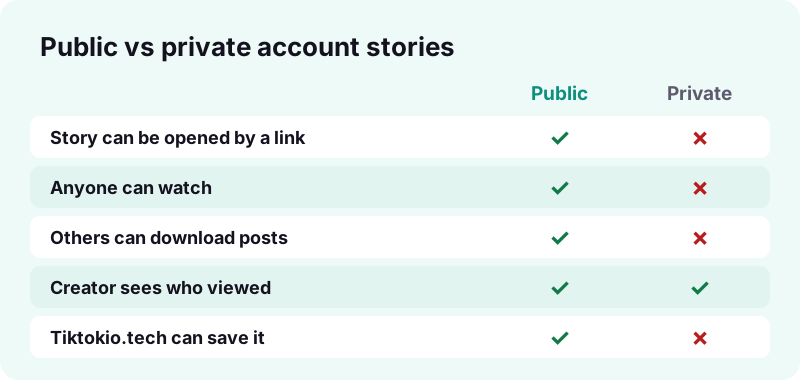
TikTok's page on private and public accounts lists what changes:
- On a private account, people cannot Duet, Stitch, make stickers from or download the posts.
- Other users also cannot add a private account's posts to their own Stories.
- On a public account, posts may be seen and shared by anyone, on or off TikTok, depending on the settings.
- The name, username and profile photo stay visible to everyone in both cases.
Can a story downloader open private stories?
No honest one can. Sites that promise private Stories either fail or ask for your login. We do not try: if TikTok does not serve the file, we cannot get it.
How do you download a TikTok story?
Copy the Story's link while it is live, paste it in the box at the top of this page and tap Download. Then save the video, image or audio that appears.
- Open the public Story in the TikTok app or on tiktok.com.
- Tap Share and choose Copy link.
- Paste the link into the Tiktokio.tech box.
- Tap Download and wait a second or two.
- Save the MP4, the image or the sound to your device.
How fast is it?
Our server reads a public TikTok link in about 0.6 to 1.8 seconds. The file then comes straight from TikTok's CDN, so the rest depends on your connection.
Which link formats work?
- Short share links such as
vt.tiktok.com/…orvm.tiktok.com/…. - Full links that contain
/video/or/photo/and a long number. - Links from
m.tiktok.comin a mobile browser.
How do you copy a TikTok story link?
Open the Story and look for the Share button. If TikTok offers Copy link there, tap it; the link is now on your clipboard and ready for the TikTok story downloader.
TikTok's sharing guide describes the same pattern for posts: tap Share, then choose how you want to share. Stories have a Share button too; TikTok's Stories page mentions it at the bottom of a Story.
What if there is no Copy link option?
- The Story may be limited to friends, so TikTok gives no public link.
- The account may be private.
- Your app version may place the option under a different label. Update TikTok and look again.
- You can also open the creator's profile on tiktok.com in a browser and copy the address from there.
How can you tell if a link points to a story?
After the redirect, a Story link opens a normal post address with a long number in it. Our server follows short links the same way for Stories, videos and photo posts.
How do you save a TikTok story on iPhone?
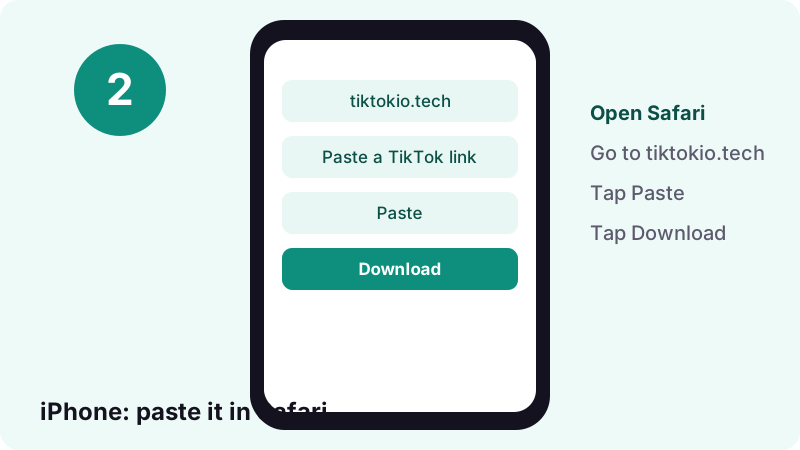
Use Safari: paste the Story link here, tap Download, then open the file from the Downloads folder in the Files app. From there you can share it to Photos.
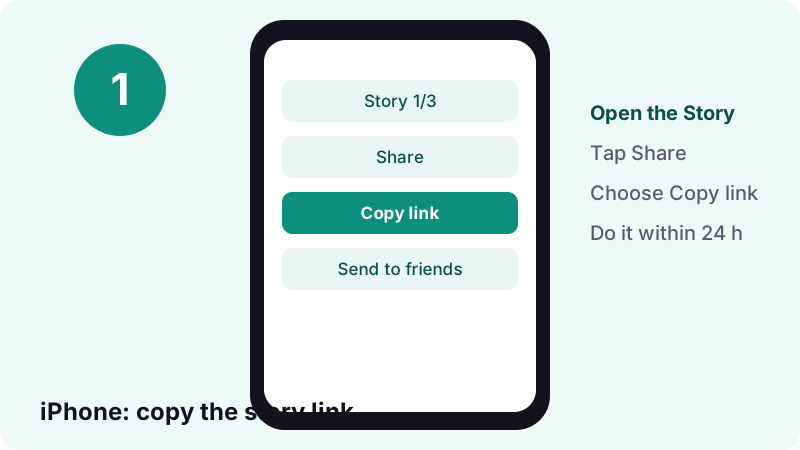
- In TikTok, open the Story, tap Share, then Copy link.
- Open Safari, go to tiktokio.tech and paste the link.
- Tap Download, then the save button for the MP4 or the image.
- Open Files, tap Browse and open Downloads.
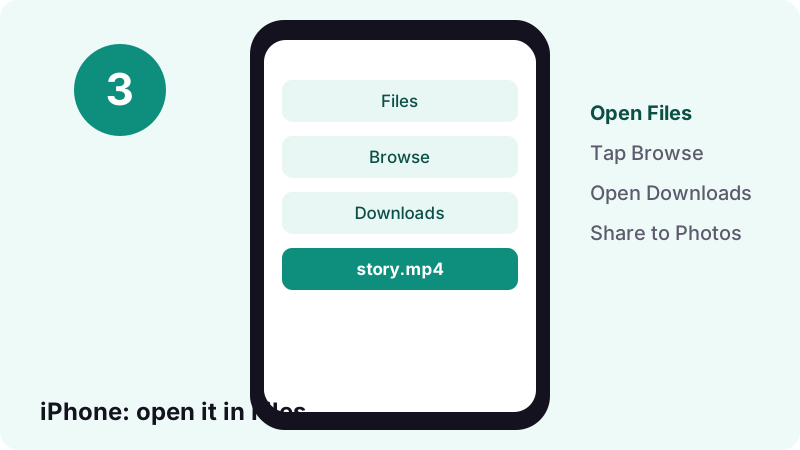
Apple's guide to downloads confirms that files from the internet go to the Downloads folder in Files, and that Safari has a Downloads button next to the search field for the latest ones.
How do you save a TikTok story on Android?
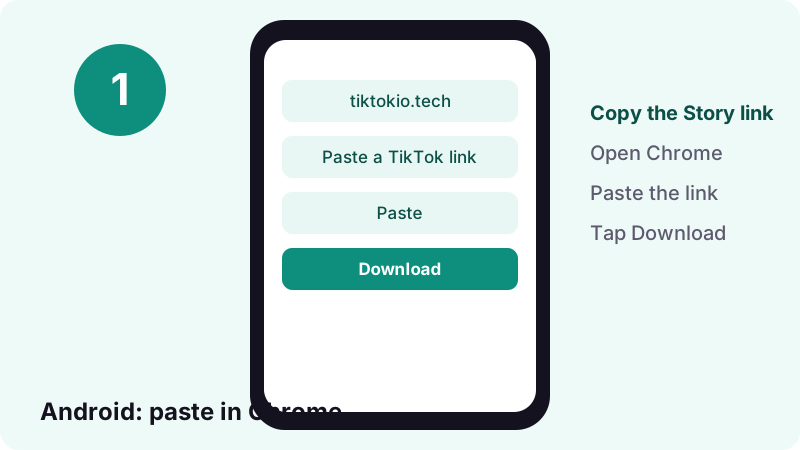
Paste the Story link in Chrome, tap Download and save the file. Android puts it in the Downloads folder, which you open from the Files app.
- In TikTok, open the Story and copy its link from the Share menu.
- Open Chrome, go to tiktokio.tech and paste the link.
- Tap Download, then save the video or image.
- Open the Files app and look in Downloads.
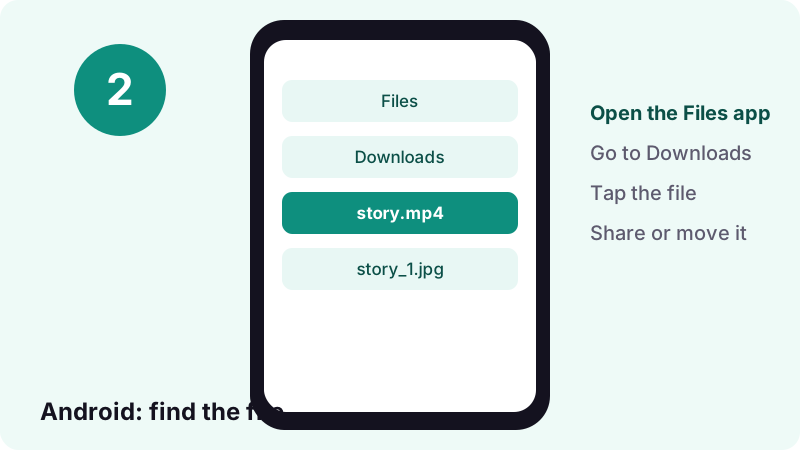
Google's Android Help notes that files usually live in the Files app, but your phone maker might use a different app. Touch and hold a file to share it or add it to Google Drive.
Can you download TikTok stories on a computer?
Yes. Open the creator's Story on tiktok.com, copy the link, paste it here and the file goes to your Downloads folder. No extension or program is needed.
- Works in Chrome, Edge, Firefox and Safari on Windows, macOS, Linux and ChromeOS.
- Right-click the video and choose to save it if the browser plays it instead of downloading.
- Rename the file after saving if you keep many Stories from the same creator.
- Open the Story on tiktok.com.
- Copy the address or use Share, then Copy link.
- Paste it into the TikTok story downloader box and press Download.
- Save the MP4 or image to your Downloads folder.
Why does a TikTok story link stop working?
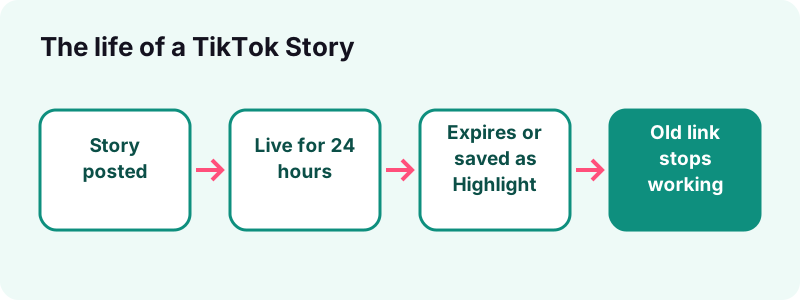
Because the Story it points to is gone. After 24 hours, or as soon as the creator deletes it, TikTok stops serving the file, so the link leads nowhere, for us and for everyone.
What does an expired story look like on our side?
Our server turns the link into a post ID and asks TikTok for it. When TikTok answers that the post is not found or is private, we stop right there instead of trying other routes, and show an error.
Is there a way to bring an expired story back?
- Ask the creator; they may have it in their Story archive or a Highlight.
- If it is your own Story, check your Highlights and your device's gallery.
- No downloader can recover a Story that TikTok no longer serves.
Our own download links expire after one hour as well. That is separate from the Story's 24 hours: paste the TikTok link again to get new ones.
What is the difference between a story and a Highlight?
A Story lasts 24 hours. A Highlight is a named group of Stories that the creator pins to the profile, so it stays visible for longer, with its own cover image and title.
How are Highlights made?
- The creator taps Profile, then Create Story Highlights.
- They pick Stories from their Story archive and tap Add.
- They choose a cover image, type a name and publish it.
- Highlights can be edited: the creator can change the cover, the name or the Stories inside.
- Highlights can be deleted by pressing and holding them on the profile.
- If a Highlight disappears, its link stops working like an expired Story.
A public Highlight can be opened like any public Story, so the TikTok story downloader can read it while the creator keeps it up.
What file formats do TikTok stories download in?
A video Story downloads as an MP4. A photo Story gives image files, the same kind of JPEG our photo tool returns for slideshows. The sound comes as M4A or MP3, depending on what TikTok stores.
| Story type | File you get | Notes |
|---|---|---|
| Video Story | MP4 | HD copy when TikTok has one, often H.265 (HEVC) |
| Photo Story | Image file(s) | Same handling as a photo post |
| Sound | M4A or MP3 | A 15-second sound is about 0.25 MB |
| Text Story | Usually nothing | There may be no media file to fetch |
- Pick the regular MP4 if you want the file to play everywhere.
- Pick the HD copy for the sharpest picture on a recent phone or computer.
- Pick the audio if you only want the sound.
Why will my phone not play the HD file?
Some HD copies use H.265 (HEVC). Recent phones play it, but older players may not. The regular MP4 is the safer choice; the HD downloader page explains the codec in depth.
Can you save the music from a TikTok story?
Yes, when the Story has a sound and TikTok serves it, an audio button appears in the result. You get the track as an audio file, separate from the video.
- Use it to find the song name later.
- Keep a sound you made yourself for a new post.
- Do not reuse a commercial song outside TikTok without the rights.
For more on audio quality and formats, read the TikTok MP3 downloader page, or learn how to find trending sounds.
How do you keep your own TikTok stories?
The safest way is to save your Story to your device before you post it. TikTok's Download content page recommends saving your posts first so you have offline copies.
- On the Post screen, tap More options.
- Turn on Save to device.
- Post your Story as usual.
What if you forgot to save it?
- Add it to a Highlight before it expires, so it stays on your profile.
- Paste its link into the TikTok story downloader while it is still public.
- Check your phone's gallery: a Story recorded with the phone camera, then uploaded, is still there.
Why won't a TikTok story download?
Usually the Story is no longer public: it expired, was deleted, or is shared only with friends. A broken link and old download links are the next causes.
Quick checks before you try again
- Open the link in a private browser window. If you cannot see the Story there, it is not public.
- Check that the 24 hours have not passed.
- Copy a fresh link from the Share menu instead of typing it.
- Paste it here again and tap Download.
Which messages mean what?
- Not found: the Story expired or was deleted.
- Private: the account or the Story is not public.
- Link not recognised: the address is not a TikTok link, or the short link no longer redirects.
- Download expired: our one-hour link ran out; paste the TikTok link again.
Is it OK to download someone else's TikTok story?
Saving a public Story to watch again yourself is one thing; re-posting it is another. The Story belongs to the person who made it, and the fact that it was public for a day does not give you the right to spread it.
What is fair, and what is not?
- Fine: keeping your own Stories, or a public Story you want to rewatch privately.
- Fine with permission: sharing a friend's Story after they said yes, with credit.
- Not fine: re-uploading someone else's Story as your own, or sharing it to mock or expose them.
- Not fine: saving Stories of a person who blocked you or limited their audience.
Stories are often personal and meant to vanish. In the US, the Copyright Office's Fair Use Index shows that fair use is decided case by case by courts, so it is not a safe excuse for re-uploads.
If you made a Story and want it blocked from this site, write to us through the DMCA page.
Is the TikTok story downloader free and safe?
Yes. It costs nothing, needs no sign-up and has no daily limit. We do not ask for your TikTok login and we do not keep the files: the links expire after one hour.
- No app or browser extension to install.
- No watermark added by us.
- Works on iPhone, Android, tablets and computers.
What this TikTok story downloader never asks for:
- your TikTok username or password,
- your email or phone number,
- money or a subscription.
Need to move a saved file into your photo gallery? Our guide on saving TikTok videos to the camera roll walks through it.
Tiktokio.tech is an independent tool and is not affiliated with TikTok or ByteDance. Read the privacy policy and the terms, or go back to the TikTok downloader home page.
Frequently asked questions
How do I use the TikTok story downloader?
Open the public Story, tap Share, then Copy link. Paste the link in the box at the top of this page and tap Download, then save the video, image or sound.
How long does a TikTok story stay up?
24 hours, according to TikTok's help center. A creator can keep it longer by adding it to a Highlight on their profile.
Can someone see that I viewed their TikTok story?
Yes, if you watch it in the app. TikTok says people can see you viewed their Story even if your account is private or your profile view history is off.
Does downloading a story with Tiktokio.tech notify the creator?
Tiktokio.tech does not log in to TikTok and sends no notice. It reads only what TikTok makes public for the link.
Can I download a story from a private account?
No. Stories from private accounts, or shared only with friends, are not public, so TikTok does not serve them to us.
Why does the story link say not found?
The Story expired after 24 hours or the creator deleted it. Once TikTok stops serving it, no tool can save it.
Can I download TikTok Highlights?
Yes, if the Highlight is public. It works like a Story that stays up, so paste its link the same way.
What format is a downloaded TikTok story?
Video Stories come as MP4, photo Stories as image files, and the sound as M4A or MP3 when TikTok serves it.
Can I re-post someone else's story?
Only with the creator's permission and credit. Stories are often personal and meant to disappear, so ask first.
Is Tiktokio.tech made by TikTok?
No. Tiktokio.tech is an independent tool and is not affiliated with tiktokio.com, TikTok or ByteDance.
Sources
- TikTok Stories — TikTok Help Center
- Watching Stories on TikTok — TikTok Help Center
- TikTok post view history — TikTok Help Center
- Choosing between a private or public account — TikTok Help Center
- Download content — TikTok Help Center
- Sharing on TikTok — TikTok Help Center
- Where to find downloads on your iPhone or iPad — Apple Support
- Find & delete files on Android — Android Help
- Making a post — TikTok Help Center
- U.S. Copyright Office Fair Use Index — U.S. Copyright Office